NordVPN · Manual WireGuard · Routers
NordVPN adds official WireGuard config files
NordVPN now provides official WireGuard .conf files through Nord Account. You can
download a server profile and import it into a standard WireGuard client, without running the
NordVPN app. For router owners, the useful change is having an official file to start from instead
of assembling one through a workaround.
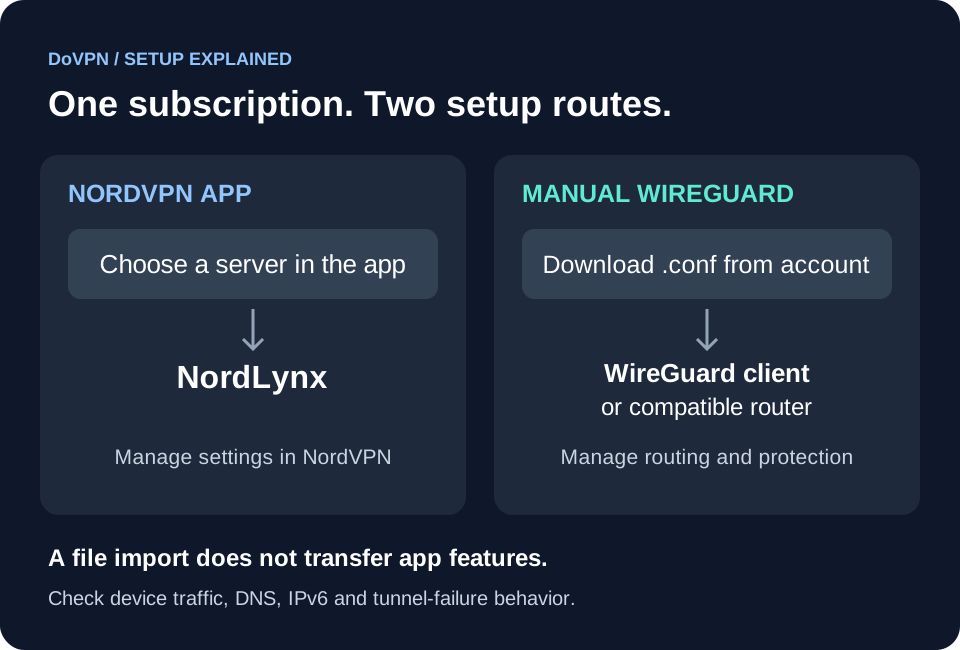
NordVPN’s manual WireGuard documentation confirms the option and separates it from NordLynx, the WireGuard-based protocol used in its own apps. An active NordVPN subscription is required.
What changed, and when?
The new option is an official, ready-to-import configuration file. NordVPN already offered WireGuard-based connections through NordLynx; this is a new way to configure a connection yourself.
In the original r/nordvpn discussion, u/masterofall20 described downloading a WireGuard profile from Nord Account and reported a successful connection: “I tested it myself, and it works!” NordVPN’s own setup guides document the same download-and-import process.
That gives readers both an official setup route and a first-hand user report of it working. The post does not identify the device used, so the router requirements below are still worth checking. The option was publicly reported by mid-October 2026; its exact launch date is unconfirmed.
How to download NordVPN WireGuard config files
Use NordVPN’s configuration-file guide as the reference if the account interface changes:
- Sign in to Nord Account and select NordVPN.
- Open Advanced Settings → Set up NordVPN manually.
- Under Server recommendation, choose your country or search for a server.
- Select a server offering WireGuard. NordVPN recommends the Verified badge.
- Choose Get setup configuration → WireGuard → Download config.
-
Import the downloaded
.confinto your WireGuard client and activate the tunnel.
The download guide’s server filters do not establish that every server type supports manual WireGuard. Check the actual options for your chosen location.
NordVPN publishes separate instructions for Windows, macOS, Linux, Android and iOS. On Windows, use Import tunnel(s) from file, then Activate. On Android and iOS, add a tunnel from a file or archive.
The guides list service credentials among their prerequisites, but the documented WireGuard import steps use the downloaded file. Do not add your Nord Account password to a configuration or give it to an unofficial generator.
Linux: use the downloaded profile with wg-quick
Install WireGuard using the instructions for your distribution first. NordVPN’s Linux
guide then moves the downloaded file into /etc/wireguard/ and uses wg-quick. For a profile saved there as nordvpn.conf:
sudo wg-quick up nordvpn
sudo wg show
# Disconnect when finished:
sudo wg-quick down nordvpn
A recent handshake and transferred data help confirm the tunnel is communicating. They do not prove that every device or application uses it. NordVPN also documents downloading separate profiles to change servers.
Which routers can use the files?
Check for a WireGuard VPN client in your exact model and firmware. A WireGuard server feature, used to connect back home, is a different capability. File import is also only part of the job: the router must send your chosen devices through the tunnel.
| Platform | What the documentation establishes | What to check |
|---|---|---|
| UniFi gateways | Ubiquiti documents file import on its Next-Gen and Cloud Gateways. | A connected tunnel does not automatically route device traffic. Add the required Traffic Route. |
| GL.iNet | Firmware 4.9 documentation puts profile imports under VPN → VPN Client Profile. | Earlier firmware uses different menus. Follow the guide for your version. |
| pfSense | NordVPN’s pfSense 2.5 guide still describes OpenVPN and says NordLynx cannot be set up with the WireGuard client. | Follow a guide specific to manual WireGuard and your pfSense version; this older NordLynx warning is not a setup guide for the new files. |
| OpenWrt, Asus, OPNsense and other routers | A compatible WireGuard client is the starting requirement. | Confirm model, firmware, import format, routing and firewall behavior before buying or replacing a working setup. |
GL.iNet also has a built-in NordVPN integration on supported firmware, so an existing working installation may not need a downloaded file.
Is manual WireGuard the same as NordLynx?
NordVPN calls this manual connection WireGuard. Its NordLynx explanation describes the app protocol as WireGuard combined with a custom double-NAT system. The generic download page also uses the label “WireGuard (NordLynx)”; that label alone does not establish feature parity.
- Post-quantum protection: NordVPN’s post-quantum support page documents it for NordLynx in its apps. The manual guides do not establish equivalent protection for an imported file.
- Kill switch and reconnect behavior: check your WireGuard client or router’s settings. Exporting a profile does not export the NordVPN app’s settings.
- Threat Protection, NordWhisper and other app features: do not assume that importing a tunnel installs or enables them.
- Double NAT, DNS and IPv6: the reviewed manual guides do not establish backend parity or the exact contents and behavior of every exported profile.
We also could not establish configuration expiry, individual revocation, key rotation, simultaneous reuse or specialty-server coverage from these guides. Ask NordVPN support if one of those determines whether the setup works for you.
Before replacing a working OpenVPN setup
Keep a copy of your working settings and test one device first. To see whether switching improves your connection, compare both protocols on your own router using wired Ethernet and several runs against nearby locations.
- Check the exit IP from a device behind the router. Testing on the router alone will not tell you whether that device’s traffic follows the VPN route.
- Check DNS and IPv6 behavior. Use our IP leak test and confirm the result matches your intended routing policy.
- Test tunnel failure and recovery. If you need traffic blocked when the VPN fails, enable the router’s relevant firewall or kill-switch option and verify it.
- Protect the file. WireGuard uses private keys; treat the exported profile as sensitive. Do not post it publicly or paste it into a web generator. See WireGuard’s key-handling guidance.
Should you subscribe or switch?
Already subscribed? Try the official download if your device supports it. Keep the app if you prefer its controls and automatic server selection.
Buying for a router? Confirm the model and firmware first, then compare the upfront bill and renewal terms. A downloadable file removes a setup obstacle; it does not guarantee router speed or compatibility. Our VPN router guide explains the wider home-network considerations.
For protocol background, see our VPN protocol comparison. For restrictive networks, read what WireGuard traffic reveals before treating manual setup as a way around VPN blocking.
Sources checked 17 October 2026. Setup details come from NordVPN and router-vendor documentation; the successful connection report is attributed to its Reddit author.