What a VPN is
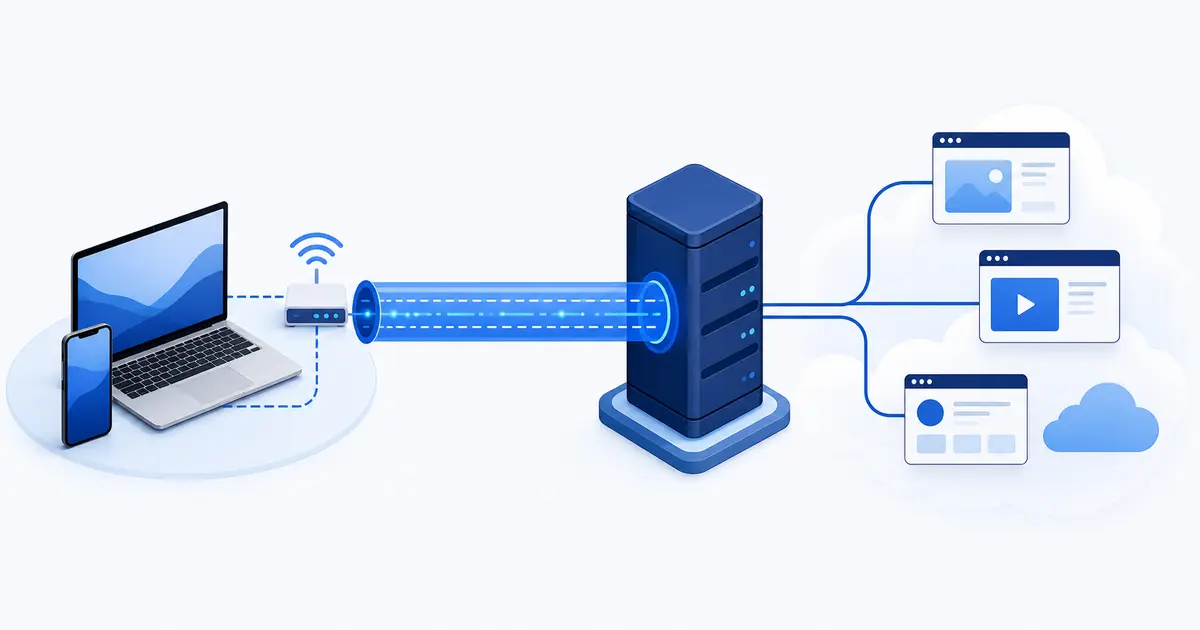
A VPN is a networking tool, not a type of antivirus. It extends a private connection across another network, usually the public internet. Encryption stops the networks in between from reading the traffic inside that connection.
The phrase covers several related setups. A work VPN lets an employee reach internal company systems. A site-to-site VPN links two office or cloud networks. A self-hosted VPN gives you remote access to your home network. A consumer VPN service sends your general internet traffic through servers operated or rented by a provider.
The network problem VPNs were built to solve
Devices on the same home or office network can often reach shared resources such as printers, file servers, a NAS or an internal dashboard. Once you leave that network, its router normally rejects unsolicited incoming connections. That is useful protection, but it also prevents your laptop or phone from reaching those private services directly.
What is a VPN provider?
A VPN provider is the company that supplies the app, account system and server network for a consumer VPN. When you connect, you are not joining the provider's private office network. You are using one of its servers as the exit point for your internet traffic.
Because the provider handles the connection before traffic leaves for its destination, choosing one is partly a trust decision. The tunnel can hide activity from your internet provider while giving the VPN company a privileged view of connection metadata. HTTPS and other end-to-end encryption still protect the contents of most modern traffic from the VPN provider.
How a VPN works, step by step
- You open the VPN app and select a server or let the app choose one.
- The app authenticates the server and negotiates temporary encryption keys.
- Your device creates a virtual network interface and routes selected traffic into it.
- The VPN protocol encrypts and wraps each packet before sending it to the server.
- The server removes the VPN layer and forwards the original packet to its destination.
- Replies return through the server and tunnel, where your device decrypts them.
This is why the word "tunnel" is useful. The tunnel protects the hop between your device and the VPN server. It does not replace HTTPS. When you visit an HTTPS site, the web connection remains encrypted between your browser and the site, including while it passes through the VPN tunnel.
Where each layer of encryption ends
The VPN tunnel and HTTPS protect different parts of the journey.
Your device
Browser, app or operating system
Encrypted VPN tunnel
VPN server
Removes the VPN layer and forwards traffic
HTTPS continues
Website or app
Receives the VPN server's public IP
Who can see what when a VPN is connected?
| Party | Usually visible | Usually hidden |
|---|---|---|
| Local Wi-Fi and ISP | Your IP address, the VPN server address, connection times and data volume | The destinations and contents carried inside a correctly configured tunnel |
| VPN provider | Your source IP, account or payment data, connection metadata, destination IPs and provider-handled DNS requests | HTTPS page contents, encrypted messages and other end-to-end encrypted data |
| Website or app | The VPN exit IP, anything you submit, your account, cookies and browser or device signals | Your usual public IP address, if no leak occurs |
This table describes a typical full-device VPN. Split tunneling, browser-only extensions, DNS settings and software bugs can change the result. Traffic patterns may also reveal clues even when the contents are encrypted.
What a VPN is useful for
More privacy from the network you are using
A correctly configured VPN prevents the local network and ISP from directly reading the destinations carried inside the tunnel. They still know your IP address and can see that you are using a VPN. You have moved part of that trust to the VPN provider, not removed it.
A different public IP address
Sites normally see the VPN server's public IP instead of yours. This can reduce simple IP-based profiling and make your apparent location match the server region. It does not erase cookies, account history or browser fingerprints.
Access to a private network
Remote-access and self-hosted VPNs let you reach office systems, a home server or a NAS without exposing those services directly to the internet. If you prefer to run your own server, our self-hosted Amnezia VPN guide explains one practical route.
Working around network blocks
A VPN can route around local filtering or censorship if the network does not block the VPN itself. Some apps include obfuscated modes designed to resemble ordinary web traffic. Laws and personal risk vary by location, so people in high-risk situations should use guidance written for their country and threat model.
Using public Wi-Fi with fewer unknowns
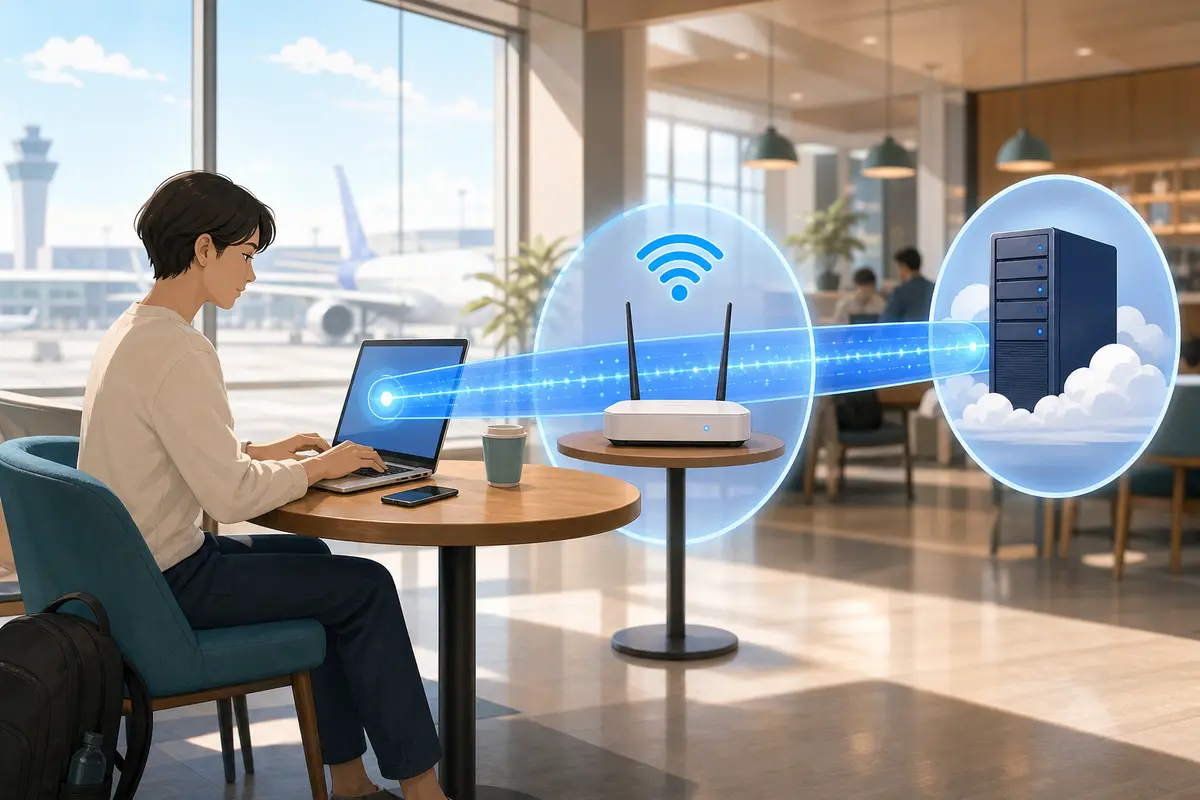
Public Wi-Fi is safer than it was when much of the web used plain HTTP. The US Federal Trade Commission notes that widespread encryption makes public Wi-Fi usually safe. A VPN still protects any unencrypted traffic and hides more metadata from the hotspot operator. It also helps when you cannot verify how an app handles its connection.
A VPN cannot tell you whether a hotspot is genuine, stop a phishing page or fix an infected device. Keep automatic updates enabled, use multi-factor authentication and confirm the network name before joining.
What a VPN cannot do
- It cannot make you anonymous. Accounts, cookies, fingerprints and behavior can identify you. Tor is designed for a stronger anonymity goal, though it has different tradeoffs.
- It cannot stop malware or phishing on its own. Some VPN apps bundle blocking features, but the tunnel itself does not inspect your judgment or repair your device.
- It cannot hide activity from a service you use. Google still knows what you do in a Google account. Your bank still sees the actions you take after signing in.
- It cannot replace HTTPS or end-to-end encryption. Those protections secure content to its destination. The VPN only adds a protected network hop.
- It cannot guarantee access to another region. Streaming and other services can block known VPN addresses, and changing regions may conflict with their terms.
- It cannot make every connection faster. A VPN may avoid a badly routed path in some cases, but encryption and an extra server usually add overhead.
The Electronic Frontier Foundation offers a useful independent overview of what VPNs do and do not protect. EFF recommends choosing the tool for the risk you are trying to reduce.
What it means to trust a VPN provider
A consumer VPN changes which organization sits in a privileged place on your network path. "No logs" is not enough on its own. Find out what the provider means by a log, which systems an audit covered, when the audit happened and whether the report is public.
Useful checks include:
- Who owns the service and which company processes payments?
- What account, diagnostic and connection data is collected?
- How long is each category retained, and can collection be disabled?
- Have the apps or server configuration been audited recently?
- Are the apps open source or otherwise available for independent review?
- How does the provider handle DNS, IPv6, kill switches and software updates?
- Does the privacy policy match what the app asks permission to access?
Are free VPNs safe?
Price alone does not decide whether a VPN is trustworthy. A limited free plan from a transparent provider can be reasonable. An unknown app with no clear business model is a poor place to route all your traffic. Avoid services that demand unrelated permissions, inject advertising, provide no ownership information or promise impossible anonymity.
VPN protocols in 2026
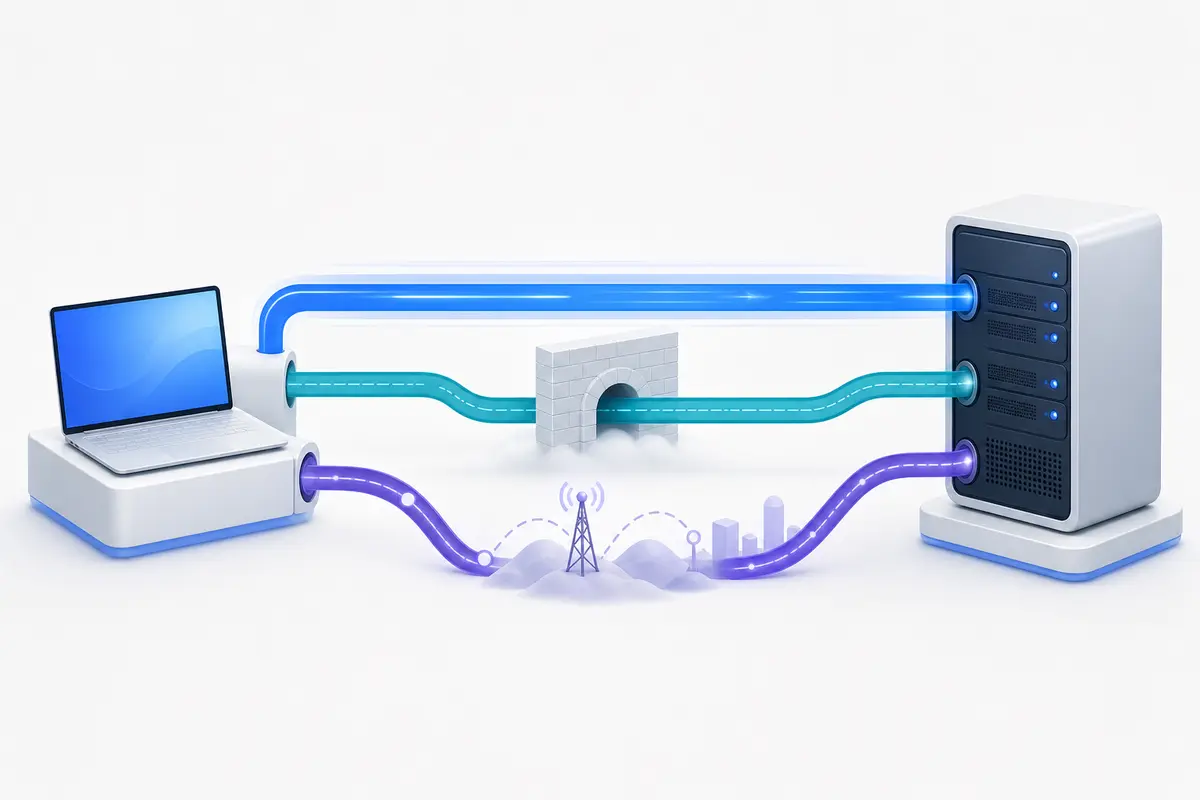
A VPN protocol defines how the client and server authenticate each other, build the tunnel and carry packets. The protocol name matters less than a sound implementation, safe defaults and prompt software updates, but it still affects speed, battery use, roaming and resistance to blocking.
| Protocol or family | Where it fits | What to know |
|---|---|---|
| WireGuard | A strong default for speed and battery life | Open source, compact and built around a fixed modern cryptographic suite. It carries packets over UDP, so providers add their own account and privacy systems. |
| OpenVPN | Compatibility and flexible network setups | Mature and open source. It can use UDP or TCP. Modern OpenVPN 2.6 deployments can use data channel offload for better performance, but configuration quality matters. |
| IKEv2/IPsec | Native OS support and mobile reconnection | A secure choice with modern settings. It can reconnect cleanly when a phone moves between Wi-Fi and cellular data, but it is easier for some networks to identify and block. |
| Obfuscated modes | Networks that detect or block ordinary VPN traffic | Examples include TLS, web-tunnel and QUIC-based wrappers. These modes may be provider-specific and slower. Use them when a standard connection fails. |
| PPTP and older options | Legacy compatibility only | PPTP is obsolete and should not be used. L2TP/IPsec offers little reason to choose it over WireGuard, OpenVPN or IKEv2 in a new setup. |
Commercial VPN apps often replace those standard names with their own technology. Our comparison of VPN protocols and provider variants explains 20 of those options and lets you filter them by platform, intended use, public source, and public assessment.
What has changed recently?
WireGuard is now the everyday default in many consumer apps, while OpenVPN remains a useful fallback. Current protocol work focuses on censorship resistance and key exchange. Providers have introduced web-tunnel, TLS and QUIC obfuscation so a VPN can connect on networks that recognize ordinary WireGuard or OpenVPN traffic.
Providers also replace the code beneath familiar protocol names. Proton's ProTUN architecture is a shared Rust implementation of WireGuard, not another wire protocol. That difference is useful when judging source code, audits, and performance claims.
The names vary by app. Proton Stealth uses obfuscated TLS tunneling over TCP, NordWhisper uses web-tunnel technology, and Mullvad offers QUIC and LWO wrappers for WireGuard. These are provider-specific implementations, not universal standards that can be selected in any VPN app.
Post-quantum protection is also moving from research into deployed products. In these deployments, the VPN software combines classical key exchange with a post-quantum method such as ML-KEM. This hybrid design protects the tunnel handshake without relying only on a newer algorithm. It does not make a provider automatically trustworthy, and standard WireGuard does not become post-quantum unless the provider adds and documents that extra layer.
There are already concrete deployments. ExpressVPN documents hybrid post-quantum protection in Lightway and its newer WireGuard implementation. Mullvad says its apps now enable quantum-resistant WireGuard tunnels by default. Proton's April 2026 roadmap describes groundwork for post-quantum encryption rather than a finished rollout.
For technical background, see the official WireGuard protocol description, the OpenVPN 2.6 manual and the IETF's IKEv2 specification.
How distance, latency and bandwidth affect a VPN
A VPN adds a server to the route and makes your device encrypt and wrap each packet. Whether you notice the difference depends on where that server is, how traffic reaches it, how busy it is and what hardware and protocol you use. One advertised speed cannot describe all of those conditions.
Latency and bandwidth are different
Latency is the delay before data makes a round trip. It affects how quickly a page starts loading, how responsive a call feels and whether a game reacts in time. Bandwidth is how much data the connection can carry per second. It matters more when you download a large file or stream high-resolution video. A connection can have high bandwidth and still feel sluggish if its latency is high.
Why the VPN server's location matters
Suppose you are in France and open a website hosted in Europe. A nearby VPN server may add only a modest detour. If you choose a server in Hong Kong, each request first travels from France to Hong Kong and then back toward Europe. The reply has to make the journey in reverse. That can add tens of thousands of kilometres to a round trip.
A distant VPN server can create a long detour
Example: a person in France opens a service hosted elsewhere in Europe.
Without the distant detour
Shorter routeWith a VPN server in Hong Kong
Longer routeExtra distance creates a physical floor on latency, but geography is not the whole story. Cables do not run in straight lines, and networks exchange traffic through peering points. Congestion, packet loss, queues and the VPN server's workload can add more delay. A farther server with good routing can occasionally beat a nearer one with a poor route, which is why a real test is more useful than the map alone.
Your speed is limited by the slowest part of the route
The practical limit may be any of these:
- your Wi-Fi, mobile or broadband connection;
- the route between your internet provider and the VPN server;
- the VPN server's available capacity;
- the provider's route from that server to the destination; or
- the destination service itself.
Modern phones and computers usually handle WireGuard and other current protocols without difficulty. An older router running the VPN for an entire household may become a bottleneck because encrypting traffic is more demanding than ordinary packet forwarding. Multihop and obfuscated modes also do extra work and usually add delay, so enable them for a reason rather than by default.
How to compare performance fairly
- Use the same device, Wi-Fi connection and test service for every run.
- Measure latency, download and upload speed once without the VPN.
- Connect to a nearby server and repeat the test several times.
- Try another nearby server before deciding the whole service is slow.
- Compare protocols only after keeping the server and other conditions the same.
VPN features that matter in daily use
- Kill switch
- Blocks traffic when the tunnel drops. Test it rather than assuming the label covers every app, network change and reboot state.
- DNS and IPv6 handling
- DNS requests and IPv6 traffic should follow the intended route. A mismatch can reveal information outside the tunnel.
- Split tunneling
- Sends only selected apps or destinations through the VPN. This is useful for local devices and performance, but excluded traffic keeps using your normal connection.
- Auto-connect
- Starts the VPN on untrusted networks or at boot. A dependable automatic rule is often more useful than an exotic feature you never enable.
- Obfuscation
- Helps the connection resemble ordinary web traffic when a network blocks recognizable VPN protocols. It is not an anonymity layer.
- Multihop
- Routes traffic through more than one VPN server. It can reduce the value of one server being observed, but it adds latency and does not fix account or browser tracking.
How to set up and test a VPN
- Download the app from the provider's official site or your platform's app store.
- Leave the protocol on automatic at first, or choose WireGuard if you need a manual default.
- Choose a nearby server unless you specifically need another region.
- Connect, then confirm the app reports a stable tunnel.
- Open the DoVPN IP leak test and check the visible IP, country, DNS servers, IPv6 and WebRTC results.
- Use the VPN kill switch test to see what happens when the connection is interrupted.
- Repeat the leak check after sleep, a Wi-Fi change and a switch to mobile data.
Run an IP test before connecting as well. The before-and-after comparison tells you what changed and helps you recognize your ISP, usual public IP and normal DNS resolver. If a result is unclear, the DNS, IP and WebRTC leak guide explains the difference.
How to choose a VPN service
Start with the job you want the VPN to do, then compare providers on that basis.
- For everyday privacy: look for a clear data policy, recent audit, reliable kill switch and correct DNS and IPv6 handling.
- For travel: prioritize stable mobile apps, nearby servers, automatic connection and an obfuscated fallback.
- For remote access: decide whether you need a commercial exit server or a self-hosted route back to a network you control.
- For several devices: check supported operating systems, simultaneous connection rules and whether your router is compatible.
- For a long subscription: compare the full renewal price, refund terms and cancellation method, not only the introductory monthly figure.
Server count alone says little about capacity or quality. A smaller network with good routing and transparent operations may work better than a long location list. If you want a shortlist after deciding what matters to you, see our current VPN comparison.
VPNs, proxies, encrypted DNS and Tor
| Tool | Best suited to | Main limitation |
|---|---|---|
| VPN | Routing device or app traffic through another network with an encrypted first hop | Requires trust in the VPN operator |
| Proxy | Changing the route for one app or protocol | May not encrypt traffic and does not cover the whole device |
| Encrypted DNS | Hiding DNS lookups from the local network | Does not change your public IP or route other traffic |
| Tor Browser | Stronger browser anonymity through multiple relays | Slower, browser-focused and sometimes blocked by services |
Do you need a VPN?
A VPN is a good fit if you want to:
- hide destination information from your ISP or the local network;
- use a different public IP address or apparent region;
- reach a private home, work or cloud network remotely;
- protect unencrypted traffic on a network you do not control; or
- connect through a network that filters the destinations you need.
You may not need one if your only goal is to:
- stop websites from tracking an account you use;
- avoid phishing, malware or scams;
- make HTTPS banking traffic encrypted, because HTTPS already does that; or
- become anonymous without changing your accounts, browser and behavior.
A VPN is useful when its network properties match your problem. Treat it as one layer alongside software updates, HTTPS, multi-factor authentication, a password manager and careful account choices.
Frequently asked questions
What is a VPN in simple terms?
A VPN is an encrypted connection from your device to a VPN server. Your internet traffic leaves through that server, so the local network and internet provider see the VPN connection while websites see the server IP address instead of your usual public IP address.
Does a VPN make you anonymous?
No. A VPN changes your visible IP address, but websites can still recognize you through accounts, cookies, browser fingerprints and information you provide. The VPN provider also becomes a party you have to trust.
Do I need a VPN on public Wi-Fi?
HTTPS already protects the contents of most web traffic, so public Wi-Fi is safer than it once was. A VPN can still hide more connection metadata from the hotspot operator and protect any unencrypted traffic, provided the VPN is configured correctly.
Which VPN protocol should I use?
For most people, the app default or WireGuard is a good starting point. OpenVPN remains useful for compatibility and restrictive networks, while IKEv2/IPsec can be dependable when a mobile device changes networks. Use an obfuscated mode only when ordinary VPN traffic is blocked.
Is using a VPN legal?
VPNs are legal in many countries, but laws and network rules vary. A VPN does not make an illegal act legal, and using one to change regions may conflict with a service agreement. Check the rules that apply where you are.
Will a VPN slow down my connection?
Usually, to some degree. Encryption adds work and the route through the VPN server adds distance. A nearby, lightly loaded server using a modern protocol can keep the difference small, but no provider can promise zero overhead on every connection.
Check the connection you have now
The quickest practical check is to compare your visible IP and DNS results before and after the VPN connects.
Run the IP leak testEditorial note
This guide is educational and is reviewed when protocols or common VPN behavior change.